Option 3 — Top-Level Integration Strategy
Note
We’re assuming your RTL files still have the modifications from Options 1 and 2.
Please follow Options 1 and 2 first if you haven’t already.
In the top-level integration methodology, we will need the AES with the wishbone wrapper as a macro, then integrate it in the User Project’s Wrapper with optimizations and cell insertion enabled on the top level.
AES Wishbone Wrapper Hardening
For the AES, we can use the macro hardened in the Macro-first hardening strategy here.
User Project Wrapper Hardening
Configuration
The following edits are needed for this strategy:
Change the Hardening strategy variables:
    "//": "Hardening strategy variables (this is for 3-Top-Level Integration). Visit https://docs.google.com/document/d/1pf-wbpgjeNEM-1TcvX2OJTkHjqH_C9p-LURCASS0Zo8 for more info",
    "SYNTH_ELABORATE_ONLY": false,
    "RUN_POST_GPL_DESIGN_REPAIR": true,
    "RUN_POST_CTS_RESIZER_TIMING": true,
    "DESIGN_REPAIR_BUFFER_INPUT_PORTS": true,
    "PDN_ENABLE_RAILS": true,
    "RUN_ANTENNA_REPAIR": true,
    "RUN_FILL_INSERTION": true,
    "RUN_TAP_ENDCAP_INSERTION": true,
    "RUN_CTS": true,
    "RUN_IRDROP_REPORT": false,
Since we will have the AES as macro, the Macro Configurations section should be reverted:
    "//": "Macros configurations",
    "MACROS": {
        "aes_wb_wrapper": {
            "gds": [
                "dir::../../gds/aes_wb_wrapper.gds"
            ],
            "lef": [
                "dir::../../lef/aes_wb_wrapper.lef"
            ],
            "instances": {
                "mprj": {
                    "location": [1500, 1500],
                    "orientation": "N"
                }
            },
            "nl": [
                "dir::../../verilog/gl/aes_wb_wrapper.v"
            ],
            "spef": {
                "min_*": [
                    "dir::../../spef/multicorner/aes_wb_wrapper.min.spef"
                ],
                "nom_*": [
                    "dir::../../spef/multicorner/aes_wb_wrapper.nom.spef"
                ],
                "max_*": [
                    "dir::../../spef/multicorner/aes_wb_wrapper.max.spef"
                ]
            },
            "lib": {
                "*": "dir::../../lib/aes_wb_wrapper.lib"
            }
        }
    },
    "PDN_MACRO_CONNECTIONS": ["mprj vccd2 vssd2 VPWR VGND"],
Change the new variables section to just have the antenna and maximum wire-length variables
    "//": "New variables",
    "GRT_ANTENNA_ITERS": 10,
    "RUN_HEURISTIC_DIODE_INSERTION": true,
    "HEURISTIC_ANTENNA_THRESHOLD": 200,
    "DESIGN_REPAIR_MAX_WIRE_LENGTH": 800,
    "CTS_CLK_MAX_WIRE_LENGTH": 800,
So, the final config.json for the User Project’s Wrapper will be:
config.json
{
    "QUIT_ON_SYNTH_CHECKS": false,

    "//": "Design files",
    "VERILOG_FILES": [
        "dir::../../verilog/rtl/defines.v",
        "dir::../../verilog/rtl/user_project_wrapper.v"
    ],
    "PNR_SDC_FILE": "dir::pnr.sdc",

    "//": "Hardening strategy variables (this is for 3-Top-Level Integration). Visit https://docs.google.com/document/d/1pf-wbpgjeNEM-1TcvX2OJTkHjqH_C9p-LURCASS0Zo8 for more info",
    "SYNTH_ELABORATE_ONLY": false,
    "RUN_POST_GPL_DESIGN_REPAIR": true,
    "RUN_POST_CTS_RESIZER_TIMING": true,
    "DESIGN_REPAIR_BUFFER_INPUT_PORTS": true,
    "PDN_ENABLE_RAILS": true,
    "RUN_ANTENNA_REPAIR": true,
    "RUN_FILL_INSERTION": true,
    "RUN_TAP_ENDCAP_INSERTION": true,
    "RUN_CTS": true,
    "RUN_IRDROP_REPORT": false,

    "//": "Macros configurations",
    "MACROS": {
        "aes_wb_wrapper": {
            "gds": [
                "dir::../../gds/aes_wb_wrapper.gds"
            ],
            "lef": [
                "dir::../../lef/aes_wb_wrapper.lef"
            ],
            "instances": {
                "mprj": {
                    "location": [1500, 1500],
                    "orientation": "N"
                }
            },
            "nl": [
                "dir::../../verilog/gl/aes_wb_wrapper.v"
            ],
            "spef": {
                "min_*": [
                    "dir::../../spef/multicorner/aes_wb_wrapper.min.spef"
                ],
                "nom_*": [
                    "dir::../../spef/multicorner/aes_wb_wrapper.nom.spef"
                ],
                "max_*": [
                    "dir::../../spef/multicorner/aes_wb_wrapper.max.spef"
                ]
            },
            "lib": {
                "*": "dir::../../lib/aes_wb_wrapper.lib"
            }
        }
    },
    "PDN_MACRO_CONNECTIONS": ["mprj vccd2 vssd2 VPWR VGND"],

    "//": "PDN configurations",
    "PDN_VOFFSET": 5,
    "PDN_HOFFSET": 5,
    "PDN_VWIDTH": 3.1,
    "PDN_HWIDTH": 3.1,
    "PDN_VSPACING": 15.5,
    "PDN_HSPACING": 15.5,
    "PDN_VPITCH": 180,
    "PDN_HPITCH": 180,
    "QUIT_ON_PDN_VIOLATIONS": false,

    "//": "Magic variables",
    "MAGIC_DRC_USE_GDS": true,

    "MAX_TRANSITION_CONSTRAINT": 1.5,

    "//": "Fixed configurations for caravel. You should NOT edit this section",
    "DESIGN_NAME": "user_project_wrapper",
    "FP_SIZING": "absolute",
    "DIE_AREA": [0, 0, 2920, 3520],
    "FP_DEF_TEMPLATE": "dir::fixed_dont_change/user_project_wrapper.def",
    "VDD_NETS": [
        "vccd1",
        "vccd2",
        "vdda1",
        "vdda2"
    ],
    "GND_NETS": [
        "vssd1",
        "vssd2",
        "vssa1",
        "vssa2"
    ],
    "PDN_CORE_RING": 1,
    "PDN_CORE_RING_VWIDTH": 3.1,
    "PDN_CORE_RING_HWIDTH": 3.1,
    "PDN_CORE_RING_VOFFSET": 12.45,
    "PDN_CORE_RING_HOFFSET": 12.45,
    "PDN_CORE_RING_VSPACING": 1.7,
    "PDN_CORE_RING_HSPACING": 1.7,
    "CLOCK_PORT": "wb_clk_i",
    "SIGNOFF_SDC_FILE": "dir::signoff.sdc",
    "MAGIC_DEF_LABELS": 0,
    "CLOCK_PERIOD": 25,
    "MAGIC_ZEROIZE_ORIGIN": 0
}
Running the flow
To harden macros with LibreLane, we use the default flow, Classic.
[nix-shell:~/librelane]$ librelane ~/caravel_aes_accelerator/openlane/user_project_wrapper/config.json
The flow will finish successfully in ~1.5 hours and we will see:
Flow complete.
Viewing the layout
To open the final GDSII layout run this command:
[nix-shell:~/librelane]$ librelane --last-run --flow openinklayout ~/caravel_aes_accelerator/openlane/user_project_wrapper/config.json
Now, we can see that there are STD cells all over the user_project_wrapper and
there is our macro in the middle.
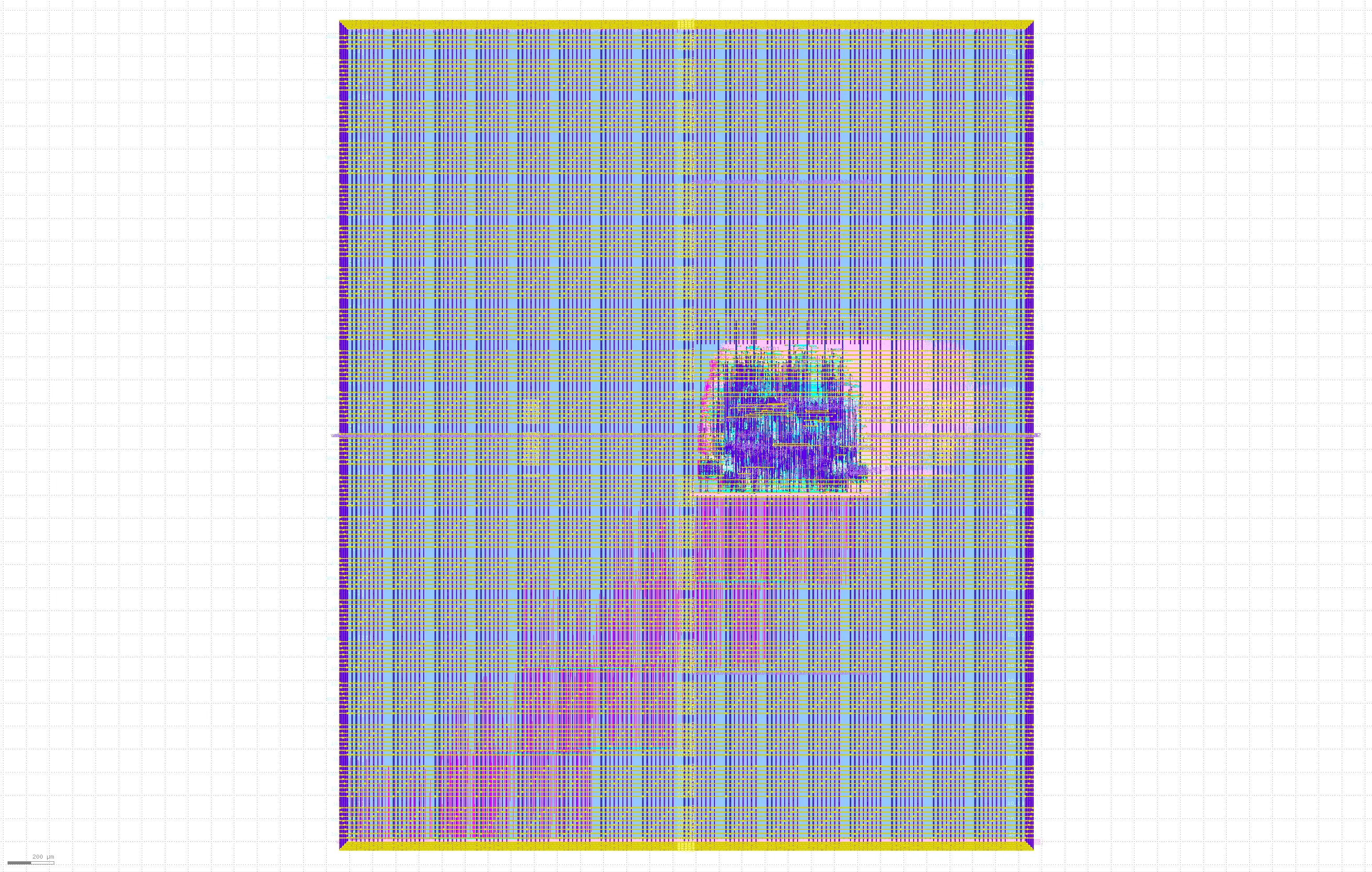
Fig. 31 Final layout of the user_project_wrapper with Top-level integration
Checking the reports
OpenROAD.CheckAntennas
There should once again be no antenna violations.
┏━━━━━━━━━━━━━━━━━━┳━━━━━━━━━━┳━━━━━━━━━┳━━━━━┳━━━━━┳━━━━━━━┓
┃ Partial/Required ┃ Required ┃ Partial ┃ Net ┃ Pin ┃ Layer ┃
┡━━━━━━━━━━━━━━━━━━╇━━━━━━━━━━╇━━━━━━━━━╇━━━━━╇━━━━━╇━━━━━━━┩
└──────────────────┴──────────┴─────────┴─────┴─────┴───────┘
OpenROAD.STAPostPnR
Looking at xx-openroad-stapostpnr/summary.rpt, there are no issues.
┏━━━━━━━━━━━━━━━┳━━━━━━━━━━━━━━━┳━━━━━━━━━━━━━━━┳━━━━━━━━━━┳━━━━━━━━━━━━━━━┳━━━━━━━━━━━━━━┳━━━━━━━━━━━━━━━┳━━━━━━━━━━━━━━┳━━━━━━━━━━━┳━━━━━━━━━━━━━━━┳━━━━━━━━━━━━━━┳━━━━━━━━━━━━━━━┳━━━━━━━━━━━━━━┓
┃               ┃ Hold Worst    ┃ Reg to Reg    ┃          ┃ Hold          ┃ of which Reg ┃ Setup Worst   ┃ Reg to Reg   ┃           ┃ Setup         ┃ of which Reg ┃ Max Cap       ┃ Max Slew     ┃
┃ Corner/Group  ┃ Slack         ┃ Paths         ┃ Hold TNS ┃ Violations    ┃ to Reg       ┃ Slack         ┃ Paths        ┃ Setup TNS ┃ Violations    ┃ to Reg       ┃ Violations    ┃ Violations   ┃
┡━━━━━━━━━━━━━━━╇━━━━━━━━━━━━━━━╇━━━━━━━━━━━━━━━╇━━━━━━━━━━╇━━━━━━━━━━━━━━━╇━━━━━━━━━━━━━━╇━━━━━━━━━━━━━━━╇━━━━━━━━━━━━━━╇━━━━━━━━━━━╇━━━━━━━━━━━━━━━╇━━━━━━━━━━━━━━╇━━━━━━━━━━━━━━━╇━━━━━━━━━━━━━━┩
│ Overall       │ 0.0394        │ 0.0394        │ 0.0000   │ 0             │ 0            │ 2.9640        │ 7.0837       │ 0.0000    │ 0             │ 0            │ 0             │ 0            │
│ nom_tt_025C_… │ 0.2089        │ 0.2089        │ 0.0000   │ 0             │ 0            │ 9.2328        │ 16.3319      │ 0.0000    │ 0             │ 0            │ 0             │ 0            │
│ nom_ss_100C_… │ 0.6504        │ 0.6504        │ 0.0000   │ 0             │ 0            │ 3.2635        │ 7.4518       │ 0.0000    │ 0             │ 0            │ 0             │ 0            │
│ nom_ff_n40C_… │ 0.0444        │ 0.0444        │ 0.0000   │ 0             │ 0            │ 10.9069       │ 19.5798      │ 0.0000    │ 0             │ 0            │ 0             │ 0            │
│ min_tt_025C_… │ 0.2026        │ 0.2026        │ 0.0000   │ 0             │ 0            │ 9.4448        │ 16.5702      │ 0.0000    │ 0             │ 0            │ 0             │ 0            │
│ min_ss_100C_… │ 0.6390        │ 0.6390        │ 0.0000   │ 0             │ 0            │ 3.5688        │ 7.8739       │ 0.0000    │ 0             │ 0            │ 0             │ 0            │
│ min_ff_n40C_… │ 0.0394        │ 0.0394        │ 0.0000   │ 0             │ 0            │ 10.9061       │ 19.7497      │ 0.0000    │ 0             │ 0            │ 0             │ 0            │
│ max_tt_025C_… │ 0.2205        │ 0.2205        │ 0.0000   │ 0             │ 0            │ 9.0069        │ 16.1275      │ 0.0000    │ 0             │ 0            │ 0             │ 0            │
│ max_ss_100C_… │ 0.6725        │ 0.6725        │ 0.0000   │ 0             │ 0            │ 2.9640        │ 7.0837       │ 0.0000    │ 0             │ 0            │ 0             │ 0            │
│ max_ff_n40C_… │ 0.0515        │ 0.0515        │ 0.0000   │ 0             │ 0            │ 10.9095       │ 19.4285      │ 0.0000    │ 0             │ 0            │ 0             │ 0            │
└───────────────┴───────────────┴───────────────┴──────────┴───────────────┴──────────────┴───────────────┴──────────────┴───────────┴───────────────┴──────────────┴───────────────┴──────────────┘
Note
Despite the fact that the macro is placed very far from the top-level pins, there are no maximum slew violations because optimizations are enabled at the top-level and the long routes are being buffered.
Magic.DRC
Under the directory xx-magic-drc, you will find a file named reports/drc.rpt
that summarizes the DRC violations reported by magic. The design is DRC clean so
the report will look like this:
aes_wb_wrapper
----------------------------------------
[INFO] COUNT: 0
[INFO] Should be divided by 3 or 4
KLayout.DRC
Under the directory xx-magic-drc, you will find a file named violations.json
that summarizes the DRC violations reported by KLayout. The design is DRC clean
so the report will look like this with "total": 0 at the end:
{
  ⋮
  "total": 0
}
Netgen.LVS
Under the directory xx-netgen-lvs, you will find a file named lvs.rpt that
summarizes the LVS violations reported by netgen. The design is LVS clean so the
last part of the report will look like this:
Cell pin lists are equivalent.
Device classes user_project_wrapper and user_project_wrapper are equivalent.

Final result: Circuits match uniquely.
Saving the views
To save the views, run the following script with the following arguments in order:
The directory of the project
The macro name
The successful run tag
[nix-shell:~/librelane]$ bash ~/caravel_aes_accelerator/openlane/copy_views.sh ~/caravel_aes_accelerator user_project_wrapper RUN_TAG
This will copy the physical views of the macro in the specified run to your project folder.
Congrats! Now you have a third different AES accelerator as a Caravel user project.