Option 1 — Macro-First Hardening strategy
We will start with the first hardening option. That entails:
Hardening the
aescore with the Wishbone wrapper as a macroHardening the
user_project_wrapperwith theaesmacro hardened in the previous step
…the latter of which will be integrated into the Caravel harness.
AES Wishbone Wrapper Hardening
Configuration
Note
The directory is named openlane and not librelane for historical reasons.
Create a design directory to add our source files to:
$ mkdir -p ~/caravel_aes_accelerator/openlane/aes_wb_wrapper
Create the file
~/caravel_aes_accelerator/openlane/aes_wb_wrapper/config.jsonand add the following simple configuration to it
{
  "DESIGN_NAME": "aes_wb_wrapper",
  "PDN_MULTILAYER": false,
  "CLOCK_PORT": "wb_clk_i",
  "CLOCK_PERIOD": 25,
  "VERILOG_FILES": [
    "dir::../../../aes/secworks_aes/rtl/*.v",
    "dir::../../verilog/rtl/aes_wb_wrapper.v"
  ],
  "FP_CORE_UTIL": 40,
  "RT_MAX_LAYER": "met4"
}
This is a basic configuration file which has only these variables:
DESIGN_NAME: the name of the design, which is equal to the name of the top module in Verilog.CLOCK_PORT: the name of the clock port in said top module.CLOCK_PERIOD: the period of the primary clock port in nanoseconds, used to determine the chip frequency. Generally, the lowest you can get away with is the best. \(\text{f} = 1 / (\texttt{CLOCK_PERIOD}ns) = 1 / (25\text{ns}) = 40 \text{MHz}\)VERILOG_FILES: List of input Verilog files.FP_CORE_UTIL: The core utilization. Typical values for the core utilization range from 25% to 60%. 40% is a good starting value - we can adjust it later if we need to (i.e. one of the tools complains.)PDN_MULTILAYER: We set this tofalseas we are hardening a chip for integration into Caravel. You may review Power Distribution Networks for more information on this.RT_MAX_LAYER: We set this tomet4to prevent the creation of routes on the fifth metal layer, which may create obstructions interfering with PDN generation.
Running Synthesis Exploration
When running a new design, it’s always good to first find the best synthesis strategy. Synthesis strategies are scripts for the ABC utility that handles fine-grained optimization and technology mapping.
You can find a list of synthesis strategies at
SYNTH_STRATEGY. Generally, the AREA strategies result
in smaller area, while the DELAY strategies focus on a lower delay. There is
really no way to figure out which strategy would be the best for your design
ahead of time, so LibreLane provides a synthesis exploration flow that tries
all of them.
To run that flow, enter the following command:
Tip
Double-checking: are you inside a nix-shell? Your terminal prompt
should look like this:
[nix-shell:~]$
If not, enter the following command in your terminal:
$ nix-shell ~/librelane/shell.nix
Another tip
If you have less than 16 GiB of RAM, you may want to restrict the number of
parallel processes LibreLane can run by passing the flag -j1 as follows:
[nix-shell:~]$ librelane -j1 [the rest of your command]
[nix-shell:~]$ librelane ~/caravel_aes_accelerator/openlane/aes_wb_wrapper/config.json --flow SynthesisExploration
This should return a table that looks kind of like this:
┏━━━━━━━━━━━━━━━━┳━━━━━━━┳━━━━━━━━━━━━━━━┳━━━━━━━━━━━━━━━━━━━━━━━━━━━━━━━━━━━━━━━━━━━━━┳━━━━━━━━━━━━━━━━━━━━━━━━┳━━━━━━━━━━━━━━━━━━━━━━━━━━━━┓
┃ SYNTH_STRATEGY ┃ Gates ┃ Area (µm²)    ┃ Worst Register-to-Register Setup Slack (ns) ┃ Worst Setup Slack (ns) ┃ Total -ve Setup Slack (ns) ┃
┡━━━━━━━━━━━━━━━━╇━━━━━━━╇━━━━━━━━━━━━━━━╇━━━━━━━━━━━━━━━━━━━━━━━━━━━━━━━━━━━━━━━━━━━━━╇━━━━━━━━━━━━━━━━━━━━━━━━╇━━━━━━━━━━━━━━━━━━━━━━━━━━━━┩
│ AREA 0         │ 18699 │ 224750.553600 │ -3.678872                                   │ -23.16954693684463     │ -70604.06114353641         │
│ AREA 1         │ 18440 │ 223714.560000 │ 2.928326                                    │ -23.16954693684463     │ -69382.42054960704         │
│ AREA 2         │ 18182 │ 220866.828800 │ 3.088555                                    │ -23.16954693684463     │ -69382.42054960704         │
│ AREA 3         │ 34425 │ 310343.894400 │ 10.985539                                   │ -23.16954693684463     │ -69382.42054960704         │
│ DELAY 0        │ 25047 │ 289742.886400 │ -2.446718                                   │ -23.16954693684463     │ -69590.4983913423          │
│ DELAY 1        │ 26409 │ 300157.875200 │ -9.997910                                   │ -23.16954693684463     │ -71329.1176162534          │
│ DELAY 2        │ 25996 │ 296683.292800 │ -9.903142                                   │ -23.16954693684463     │ -71459.85930232028         │
│ DELAY 3        │ 24572 │ 285931.731200 │ -14.924423                                  │ -23.16954693684463     │ -72522.01817679392         │
│ DELAY 4        │ 24181 │ 256146.915200 │ 10.684316                                   │ -23.16954693684463     │ -69382.42054960704         │
└────────────────┴───────┴───────────────┴─────────────────────────────────────────────┴────────────────────────┴────────────────────────────┘
You’ll notice they all share the same worst setup slack, but DELAY 4 has both
a reasonable area and the second best minimum register-to-register setup slack.
The non-register-to-register setup slacks can typically only be addressed with
more realistic constraints, which we’ll dicuss later, but for now, we’re going
to add this to our config.json to use the DELAY 4 strategy:
"SYNTH_STRATEGY": "DELAY 4"
Running the flow
To harden macros with LibreLane, we use the default flow, Classic.
You can pass either --flow Classic or omit the flag altogether.
[nix-shell:~]$ librelane ~/caravel_aes_accelerator/openlane/aes_wb_wrapper/config.json
The flow will finish successfully in ~20 minutes (may vary depending on the speed of your computer) and you will see:
Flow complete.
Viewing the layout
To open the final GDSII layout run this command:
[nix-shell:~/librelane]$ librelane --last-run --flow openinklayout ~/caravel_aes_accelerator/openlane/aes_wb_wrapper/config.json
This opens KLayout and you should be able to see the following:
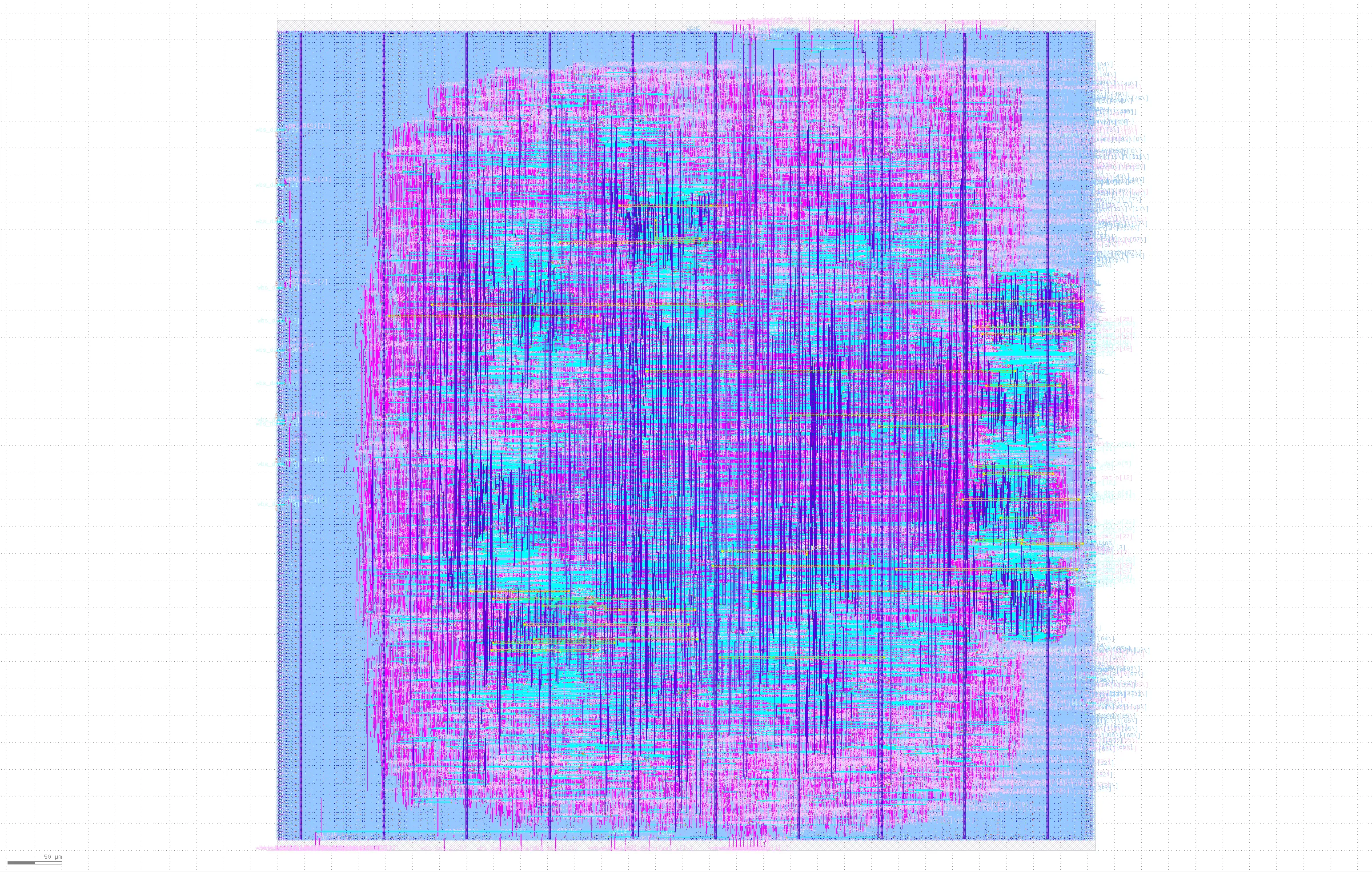
Fig. 25 Final layout of aes_wb_wrapper
Tip
You can control the visible layers in KLayout by double-clicking on the
layers you want to hide/unhide. In this figure, the layers areaid.lowTapDensity
and areaid.standardc were hidden to view the layout more clearly.
Checking the reports
You’ll find that a run directory (named something like
runs/RUN_2024-02-05_16-46-01) was created when you ran LibreLane. Under this
folder, the logs, reports, and physical views will be located. It is always a
good idea to review all logs and reports for all the steps in your run. However,
in this guide, we will only review the main signoff reports from a couple of
steps.
Tip
The names of step directories are constructed as follows:
{ordinal}-{step_id_slugified}
…where ordinal is a counter showing in what order a step was run, and
step_id_slugified is, broadly, the step’s ID converted to lowercase and
dots replaced with dashes.
OpenROAD.CheckAntennas
On this design with LibreLane ≥3.0.0, there should be no antenna violations.
┏━━━━━━━━━━━━━━━━━━┳━━━━━━━━━━┳━━━━━━━━━┳━━━━━┳━━━━━┳━━━━━━━┓
┃ Partial/Required ┃ Required ┃ Partial ┃ Net ┃ Pin ┃ Layer ┃
┡━━━━━━━━━━━━━━━━━━╇━━━━━━━━━━╇━━━━━━━━━╇━━━━━╇━━━━━╇━━━━━━━┩
└──────────────────┴──────────┴─────────┴─────┴─────┴───────┘
Nonetheless, for other designs they may occur. In that scenario, you may elect to apply one or more of these solutions:
Increase the number of iterations for antenna repair using
GRT_ANTENNA_REPAIR_ITERS. The default value is3. We can increase it to10by adding this to ourconfig.jsonfile.
"GRT_ANTENNA_REPAIR_ITERS": 10,
Increase the margin for antenna repair using
GRT_ANTENNA_REPAIR_MARGIN. The default value is10. We can increase it to15.
"GRT_ANTENNA_REPAIR_MARGIN": 15,
Enable heuristic diode insertion using
RUN_HEURISTIC_DIODE_INSERTION:
"RUN_HEURISTIC_DIODE_INSERTION": true,
Constrain the max wire length (in µm) using
DESIGN_REPAIR_MAX_WIRE_LENGTH.
"DESIGN_REPAIR_MAX_WIRE_LENGTH": 800,
Optimize the global placement for minimum wire length using
PL_WIRE_LENGTH_COEF.
"PL_WIRE_LENGTH_COEF": 0.05,
OpenROAD.STAPostPNR
Under xx-openroad-stapostpnr there should be a file called summary.rpt:
┏━━━━━━━━━━━━━━┳━━━━━━━━━━━━━━┳━━━━━━━━━━━━━━┳━━━━━━━━━━┳━━━━━━━━━━━━━━┳━━━━━━━━━━━━━━┳━━━━━━━━━━━━━━┳━━━━━━━━━━━━━━┳━━━━━━━━━━━┳━━━━━━━━━━━━━┳━━━━━━━━━━━━━━┳━━━━━━━━━━━━━┳━━━━━━━━━━━━━━┓
┃              ┃ Hold Worst   ┃ Reg to Reg   ┃          ┃ Hold         ┃ of which Reg ┃ Setup Worst  ┃ Reg to Reg   ┃           ┃ Setup       ┃ of which Reg ┃ Max Cap     ┃ Max Slew     ┃
┃ Corner/Group ┃ Slack        ┃ Paths        ┃ Hold TNS ┃ Violations   ┃ to Reg       ┃ Slack        ┃ Paths        ┃ Setup TNS ┃ Violations  ┃ to Reg       ┃ Violations  ┃ Violations   ┃
┡━━━━━━━━━━━━━━╇━━━━━━━━━━━━━━╇━━━━━━━━━━━━━━╇━━━━━━━━━━╇━━━━━━━━━━━━━━╇━━━━━━━━━━━━━━╇━━━━━━━━━━━━━━╇━━━━━━━━━━━━━━╇━━━━━━━━━━━╇━━━━━━━━━━━━━╇━━━━━━━━━━━━━━╇━━━━━━━━━━━━━╇━━━━━━━━━━━━━━┩
│ Overall      │ 0.1045       │ 0.1045       │ 0.0000   │ 0            │ 0            │ 6.2448       │ 6.2448       │ 0.0000    │ 0           │ 0            │ 257         │ 1554         │
│ nom_tt_025C… │ 0.3111       │ 0.3111       │ 0.0000   │ 0            │ 0            │ 12.5817      │ 15.9480      │ 0.0000    │ 0           │ 0            │ 179         │ 126          │
│ nom_ss_100C… │ 0.8728       │ 0.8728       │ 0.0000   │ 0            │ 0            │ 6.6277       │ 6.6277       │ 0.0000    │ 0           │ 0            │ 191         │ 1227         │
│ nom_ff_n40C… │ 0.1058       │ 0.1058       │ 0.0000   │ 0            │ 0            │ 13.4537      │ 19.3029      │ 0.0000    │ 0           │ 0            │ 181         │ 26           │
│ min_tt_025C… │ 0.3098       │ 0.3098       │ 0.0000   │ 0            │ 0            │ 12.6013      │ 16.1989      │ 0.0000    │ 0           │ 0            │ 119         │ 76           │
│ min_ss_100C… │ 0.8712       │ 0.8712       │ 0.0000   │ 0            │ 0            │ 7.0939       │ 7.0939       │ 0.0000    │ 0           │ 0            │ 122         │ 849          │
│ min_ff_n40C… │ 0.1045       │ 0.1045       │ 0.0000   │ 0            │ 0            │ 13.4665      │ 19.4702      │ 0.0000    │ 0           │ 0            │ 119         │ 0            │
│ max_tt_025C… │ 0.3131       │ 0.3131       │ 0.0000   │ 0            │ 0            │ 12.5529      │ 15.7241      │ 0.0000    │ 0           │ 0            │ 239         │ 183          │
│ max_ss_100C… │ 0.8762       │ 0.8762       │ 0.0000   │ 0            │ 0            │ 6.2448       │ 6.2448       │ 0.0000    │ 0           │ 0            │ 257         │ 1554         │
│ max_ff_n40C… │ 0.1073       │ 0.1073       │ 0.0000   │ 0            │ 0            │ 13.4347      │ 19.1522      │ 0.0000    │ 0           │ 0            │ 239         │ 36           │
└──────────────┴──────────────┴──────────────┴──────────┴──────────────┴──────────────┴──────────────┴──────────────┴───────────┴─────────────┴──────────────┴─────────────┴──────────────┘
As seen in the report, there are no hold or setup violations. There are only Max Cap and Max Slew violations. To see the violations:
Open the report
checksunderxx-openroad-stapostpnr/max_ss_100C_1v60since this corner has the highest number of Max Cap and Max Slew violations.Search for
max slewand you will find the violations listed as follows:
Pin                                        Limit        Slew       Slack
------------------------------------------------------------------------
_31022_/B1                              0.750000    2.000525   -1.250525 (VIOLATED)
_34084_/A2                              0.750000    1.999526   -1.249526 (VIOLATED)
_31021_/Y                               0.750000    1.998896   -1.248896 (VIOLATED)
_29818_/B                               0.750000    1.815682   -1.065682 (VIOLATED)
_32128_/A2                              0.750000    1.815665   -1.065665 (VIOLATED)
_30041_/A                               0.750000    1.815654   -1.065654 (VIOLATED)
_29817_/Y                               0.750000    1.814748   -1.064748 (VIOLATED)
wire109/A                               0.750000    1.773218   -1.023218 (VIOLATED)
_21294_/Y                               0.750000    1.773215   -1.023215 (VIOLATED)
wire91/A                                0.750000    1.683392   -0.933392 (VIOLATED)
⋮
In order to fix the maximum slew/cap violations, one or more of the following solutions can be applied:
Relax the
MAX_TRANSITION_CONSTRAINTto 1.5ns as this is the constraint in the sky130 lib files
"MAX_TRANSITION_CONSTRAINT": 1.5,
Increase the slew/cap repair margins using
DESIGN_REPAIR_MAX_SLEW_PCTandDESIGN_REPAIR_MAX_CAP_PCT. The default value is 20%. You may increase it as part of your implementation process:
    "DESIGN_REPAIR_MAX_SLEW_PCT": 30,
    "DESIGN_REPAIR_MAX_CAP_PCT": 30,
Change the default timing corner using
DEFAULT_CORNERfor the corner with the most violations which will bemax_ss_100C_1v60in our case:
"DEFAULT_CORNER": "max_ss_100C_1v60",
Enable post-global routing design optimizations using
RUN_POST_GRT_DESIGN_REPAIR:
"RUN_POST_GRT_DESIGN_REPAIR": true,
Ideally, for non-trivial designs, it is recommended to use design-specific SDC files or your design using the
PNR_SDC_FILEandSIGNOFF_SDC_FILEvariables.
    "PNR_SDC_FILE": "dir::cons.sdc",
    "SIGNOFF_SDC_FILE": "dir::cons.sdc",
Magic.DRC
Under the directory xx-magic-drc, you will find a file named reports/drc_violations.magic.rpt
that summarizes the DRC violations reported by Magic. The design is DRC clean so
the report will look like this:
aes_wb_wrapper
----------------------------------------
[INFO] COUNT: 0
[INFO] Should be divided by 3 or 4
KLayout.DRC
Under the directory xx-klayout-drc, you will find a file named
reports/drc_violations.klayout.json that summarizes the DRC violations reported by KLayout. The
design is DRC clean so the report will look like this with "total": 0 at the
end:
{
  ⋮
  "total": 0
}
Netgen.LVS
Under the directory xx-netgen-lvs, you will find a file named lvs.rpt that
summarizes the LVS violations reported by netgen. The design is LVS clean so the
last part of the report will look like this:
Cell pin lists are equivalent.
Device classes aes_wb_wrapper and aes_wb_wrapper are equivalent.

Final result: Circuits match uniquely.
Re-running the flow with a modified configuration
To fix the previous issues in the implementation, the following was added to the config file:
    "DEFAULT_CORNER": "max_ss_100C_1v60",
    "RUN_POST_GRT_DESIGN_REPAIR": true,
    "PNR_SDC_FILE": "dir::pnr.sdc",
    "SIGNOFF_SDC_FILE": "dir::signoff.sdc"
…and the following 2 constraints files pnr.sdc and signoff.sdc were created
at ~/caravel_aes_accelerator/openlane/aes_wb_wrapper/:
pnr.sdc
#------------------------------------------#
# Design Constraints
#------------------------------------------#

# Clock network
set clk_input wb_clk_i
create_clock [get_ports $clk_input] -name clk -period 25
puts "\[INFO\]: Creating clock {clk} for port $clk_input with period: 25"

# Clock non-idealities
set_propagated_clock [get_clocks {clk}]
set_clock_uncertainty 0.12 [get_clocks {clk}]
puts "\[INFO\]: Setting clock uncertainty to: 0.12"

# Maximum transition time for the design nets
set_max_transition 0.75 [current_design]
puts "\[INFO\]: Setting maximum transition to: 0.75"

# Maximum fanout
set_max_fanout 16 [current_design]
puts "\[INFO\]: Setting maximum fanout to: 16"

# Timing paths delays derate
set_timing_derate -early [expr {1-0.07}]
set_timing_derate -late [expr {1+0.07}]

# Multicycle paths
set_multicycle_path -setup 2 -through [get_ports {wbs_ack_o}]
set_multicycle_path -hold 1  -through [get_ports {wbs_ack_o}]
set_multicycle_path -setup 2 -through [get_ports {wbs_cyc_i}]
set_multicycle_path -hold 1  -through [get_ports {wbs_cyc_i}]
set_multicycle_path -setup 2 -through [get_ports {wbs_stb_i}]
set_multicycle_path -hold 1  -through [get_ports {wbs_stb_i}]

#------------------------------------------#
# Retrieved Constraints then modified
#------------------------------------------#

# Clock source latency
set usr_clk_max_latency 4.57
set usr_clk_min_latency 4.11
set clk_max_latency 5.70
set clk_min_latency 4.40
set_clock_latency -source -max $clk_max_latency [get_clocks {clk}]
set_clock_latency -source -min $clk_min_latency [get_clocks {clk}]
puts "\[INFO\]: Setting clock latency range: $clk_min_latency : $clk_max_latency"

# Clock input Transition
set_input_transition 0.61 [get_ports $clk_input]

# Input delays
set_input_delay -max 3.27 -clock [get_clocks {clk}] [get_ports {wbs_sel_i[*]}]
set_input_delay -max 3.84 -clock [get_clocks {clk}] [get_ports {wbs_we_i}]
set_input_delay -max 3.99 -clock [get_clocks {clk}] [get_ports {wbs_adr_i[*]}]
set_input_delay -max 4.23 -clock [get_clocks {clk}] [get_ports {wbs_stb_i}]
set_input_delay -max 4.71 -clock [get_clocks {clk}] [get_ports {wbs_dat_i[*]}]
set_input_delay -max 4.84 -clock [get_clocks {clk}] [get_ports {wbs_cyc_i}]
set_input_delay -min 0.50 -clock [get_clocks {clk}] [get_ports {wbs_adr_i[*]}]
set_input_delay -min 0.94 -clock [get_clocks {clk}] [get_ports {wbs_dat_i[*]}]
set_input_delay -min 1.09 -clock [get_clocks {clk}] [get_ports {wbs_sel_i[*]}]
set_input_delay -min 1.55 -clock [get_clocks {clk}] [get_ports {wbs_we_i}]
set_input_delay -min 1.20 -clock [get_clocks {clk}] [get_ports {wbs_cyc_i}]
set_input_delay -min 1.46 -clock [get_clocks {clk}] [get_ports {wbs_stb_i}]

# Reset input delay
set_input_delay [expr 25 * 0.5] -clock [get_clocks {clk}] [get_ports {wb_rst_i}]

# Input Transition
set_input_transition -max 0.14  [get_ports {wbs_we_i}]
set_input_transition -max 0.15  [get_ports {wbs_stb_i}]
set_input_transition -max 0.17  [get_ports {wbs_cyc_i}]
set_input_transition -max 0.18  [get_ports {wbs_sel_i[*]}]
set_input_transition -max 0.84  [get_ports {wbs_dat_i[*]}]
set_input_transition -max 0.92  [get_ports {wbs_adr_i[*]}]
set_input_transition -min 0.07  [get_ports {wbs_adr_i[*]}]
set_input_transition -min 0.07  [get_ports {wbs_dat_i[*]}]
set_input_transition -min 0.09  [get_ports {wbs_cyc_i}]
set_input_transition -min 0.09  [get_ports {wbs_sel_i[*]}]
set_input_transition -min 0.09  [get_ports {wbs_we_i}]
set_input_transition -min 0.15  [get_ports {wbs_stb_i}]

# Output delays
set_output_delay -max 3.72 -clock [get_clocks {clk}] [get_ports {wbs_dat_o[*]}]
set_output_delay -max 8.51 -clock [get_clocks {clk}] [get_ports {wbs_ack_o}]
set_output_delay -min 1.03 -clock [get_clocks {clk}] [get_ports {wbs_dat_o[*]}]
set_output_delay -min 1.27 -clock [get_clocks {clk}] [get_ports {wbs_ack_o}]

# Output loads
set_load 0.19 [all_outputs]
signoff.sdc
#------------------------------------------#
# Design Constraints
#------------------------------------------#

# Clock network
set clk_input wb_clk_i
create_clock [get_ports $clk_input] -name clk -period 25
puts "\[INFO\]: Creating clock {clk} for port $clk_input with period: 25"

# Clock non-idealities
set_propagated_clock [get_clocks {clk}]
set_clock_uncertainty 0.1 [get_clocks {clk}]
puts "\[INFO\]: Setting clock uncertainty to: 0.1"

# Maximum transition time for the design nets
set_max_transition 1.5 [current_design]
puts "\[INFO\]: Setting maximum transition to: 1.5"

# Maximum fanout
set_max_fanout 16 [current_design]
puts "\[INFO\]: Setting maximum fanout to: 16"

# Timing paths delays derate
set_timing_derate -early [expr {1-0.05}]
set_timing_derate -late [expr {1+0.05}]
puts "\[INFO\]: Setting timing derate to: [expr {0.05 * 100}] %"

# Multicycle paths
set_multicycle_path -setup 2 -through [get_ports {wbs_ack_o}]
set_multicycle_path -hold 1  -through [get_ports {wbs_ack_o}]
set_multicycle_path -setup 2 -through [get_ports {wbs_cyc_i}]
set_multicycle_path -hold 1  -through [get_ports {wbs_cyc_i}]
set_multicycle_path -setup 2 -through [get_ports {wbs_stb_i}]
set_multicycle_path -hold 1  -through [get_ports {wbs_stb_i}]

#------------------------------------------#
# Retrieved Constraints
#------------------------------------------#

# Clock source latency
set usr_clk_max_latency 4.57
set usr_clk_min_latency 4.11
set clk_max_latency 5.57
set clk_min_latency 4.65
set_clock_latency -source -max $clk_max_latency [get_clocks {clk}]
set_clock_latency -source -min $clk_min_latency [get_clocks {clk}]
puts "\[INFO\]: Setting clock latency range: $clk_min_latency : $clk_max_latency"

# Clock input Transition
set_input_transition 0.61 [get_ports $clk_input]

# Input delays
set_input_delay -max 3.17 -clock [get_clocks {clk}] [get_ports {wbs_sel_i[*]}]
set_input_delay -max 3.74 -clock [get_clocks {clk}] [get_ports {wbs_we_i}]
set_input_delay -max 3.89 -clock [get_clocks {clk}] [get_ports {wbs_adr_i[*]}]
set_input_delay -max 4.13 -clock [get_clocks {clk}] [get_ports {wbs_stb_i}]
set_input_delay -max 4.61 -clock [get_clocks {clk}] [get_ports {wbs_dat_i[*]}]
set_input_delay -max 4.74 -clock [get_clocks {clk}] [get_ports {wbs_cyc_i}]
set_input_delay -min 0.79 -clock [get_clocks {clk}] [get_ports {wbs_adr_i[*]}]
set_input_delay -min 1.04 -clock [get_clocks {clk}] [get_ports {wbs_dat_i[*]}]
set_input_delay -min 1.19 -clock [get_clocks {clk}] [get_ports {wbs_sel_i[*]}]
set_input_delay -min 1.65 -clock [get_clocks {clk}] [get_ports {wbs_we_i}]
set_input_delay -min 1.69 -clock [get_clocks {clk}] [get_ports {wbs_cyc_i}]
set_input_delay -min 1.86 -clock [get_clocks {clk}] [get_ports {wbs_stb_i}]

# Reset input delay
set_input_delay [expr 25 * 0.5] -clock [get_clocks {clk}] [get_ports {wb_rst_i}]

# Input Transition
set_input_transition -max 0.14  [get_ports {wbs_we_i}]
set_input_transition -max 0.15  [get_ports {wbs_stb_i}]
set_input_transition -max 0.17  [get_ports {wbs_cyc_i}]
set_input_transition -max 0.18  [get_ports {wbs_sel_i[*]}]
set_input_transition -max 0.84  [get_ports {wbs_dat_i[*]}]
set_input_transition -max 0.92  [get_ports {wbs_adr_i[*]}]
set_input_transition -min 0.07  [get_ports {wbs_adr_i[*]}]
set_input_transition -min 0.07  [get_ports {wbs_dat_i[*]}]
set_input_transition -min 0.09  [get_ports {wbs_cyc_i}]
set_input_transition -min 0.09  [get_ports {wbs_sel_i[*]}]
set_input_transition -min 0.09  [get_ports {wbs_we_i}]
set_input_transition -min 0.15  [get_ports {wbs_stb_i}]

# Output delays
set_output_delay -max 3.62 -clock [get_clocks {clk}] [get_ports {wbs_dat_o[*]}]
set_output_delay -max 8.41 -clock [get_clocks {clk}] [get_ports {wbs_ack_o}]
set_output_delay -min 1.13 -clock [get_clocks {clk}] [get_ports {wbs_dat_o[*]}]
set_output_delay -min 1.37 -clock [get_clocks {clk}] [get_ports {wbs_ack_o}]

# Output loads
set_load 0.19 [all_outputs]
The Design Constraints part has to do with the design itself. The
Retrieved Constraints part is retrieved from the Caravel chip boundary
constraints with the user_project_wrapper. These constraints can be found
here.
The PnR constraints file has more aggressive constraints than the signoff one,
this is done to accommodate the gap between the optimization tool estimation of
parasitics and the final extractions on the layout.
See also
For the most comprehensive guide available on making SDC files, we recommend this excellent book by Sridhar Gangadharan and Sanjay Churiwala:
So, the final config.json is as follows:
{
    "DESIGN_NAME": "aes_wb_wrapper",
    "PDN_MULTILAYER": false,
    "CLOCK_PORT": "wb_clk_i",
    "CLOCK_PERIOD": 25,
    "VERILOG_FILES": [
        "dir::../../../secworks_aes/src/rtl/*.v",
        "dir::../../verilog/rtl/aes_wb_wrapper.v"
    ],
    "FP_CORE_UTIL": 40,
    "RT_MAX_LAYER": "met4",
    "SYNTH_STRATEGY": "DELAY 4",
    "DEFAULT_CORNER": "max_ss_100C_1v60",
    "RUN_POST_GRT_DESIGN_REPAIR": true,
    "PNR_SDC_FILE": "dir::pnr.sdc",
    "SIGNOFF_SDC_FILE": "dir::signoff.sdc"
}
Now let’s try re-running the flow:
[nix-shell:~/librelane]$ librelane ~/caravel_aes_accelerator/openlane/aes_wb_wrapper/config.json
Re-checking the reports
The antenna report under
xx-openroad-checkantennas-1/reports/antenna_summary.rpt should still have
no violations.
Note
The number of antenna violations may vary wildly depending on the configuration variables AND environment variables (such as the operating system) as the detailed router is highly heuristic.
Also, the STA report at xx-openroad-stapostpnr/summary.rpt should have no
issues (there may be single-digit max capacitance/slew violations left over.)
┏━━━━━━━━━━━┳━━━━━━━━━━━┳━━━━━━━━━━━┳━━━━━━━━━━┳━━━━━━━━━━━┳━━━━━━━━━━━┳━━━━━━━━━━━┳━━━━━━━━━━━┳━━━━━━━━━━━┳━━━━━━━━━━━┳━━━━━━━━━━━┳━━━━━━━━━━━┳━━━━━━━━━━┓
┃           ┃ Hold      ┃           ┃          ┃           ┃ of which  ┃ Setup     ┃           ┃           ┃           ┃ of which  ┃           ┃          ┃
┃           ┃ Worst     ┃ Reg to    ┃          ┃ Hold      ┃ Reg to    ┃ Worst     ┃ Reg to    ┃           ┃ Setup     ┃ Reg to    ┃ Max Cap   ┃ Max Slew ┃
┃ Corner/G… ┃ Slack     ┃ Reg Paths ┃ Hold TNS ┃ Violatio… ┃ Reg       ┃ Slack     ┃ Reg Paths ┃ Setup TNS ┃ Violatio… ┃ Reg       ┃ Violatio… ┃ Violati… ┃
┡━━━━━━━━━━━╇━━━━━━━━━━━╇━━━━━━━━━━━╇━━━━━━━━━━╇━━━━━━━━━━━╇━━━━━━━━━━━╇━━━━━━━━━━━╇━━━━━━━━━━━╇━━━━━━━━━━━╇━━━━━━━━━━━╇━━━━━━━━━━━╇━━━━━━━━━━━╇━━━━━━━━━━┩
│ Overall   │ 0.1601    │ 0.1601    │ 0.0000   │ 0         │ 0         │ 4.4661    │ 6.0628    │ 0.0000    │ 0         │ 0         │ 0         │ 0        │
│ nom_tt_0… │ 0.2973    │ 0.3282    │ 0.0000   │ 0         │ 0         │ 10.4185   │ 15.6935   │ 0.0000    │ 0         │ 0         │ 0         │ 0        │
│ nom_ss_1… │ 0.7765    │ 0.7803    │ 0.0000   │ 0         │ 0         │ 4.6415    │ 6.5571    │ 0.0000    │ 0         │ 0         │ 0         │ 0        │
│ nom_ff_n… │ 0.1650    │ 0.1650    │ 0.0000   │ 0         │ 0         │ 11.1307   │ 19.2289   │ 0.0000    │ 0         │ 0         │ 0         │ 0        │
│ min_tt_0… │ 0.3215    │ 0.3215    │ 0.0000   │ 0         │ 0         │ 10.5622   │ 15.9933   │ 0.0000    │ 0         │ 0         │ 0         │ 0        │
│ min_ss_1… │ 0.7678    │ 0.7678    │ 0.0000   │ 0         │ 0         │ 4.8466    │ 7.0670    │ 0.0000    │ 0         │ 0         │ 0         │ 0        │
│ min_ff_n… │ 0.1601    │ 0.1601    │ 0.0000   │ 0         │ 0         │ 11.1436   │ 19.4234   │ 0.0000    │ 0         │ 0         │ 0         │ 0        │
│ max_tt_0… │ 0.2648    │ 0.3330    │ 0.0000   │ 0         │ 0         │ 10.2510   │ 15.4043   │ 0.0000    │ 0         │ 0         │ 0         │ 0        │
│ max_ss_1… │ 0.7331    │ 0.7868    │ 0.0000   │ 0         │ 0         │ 4.4661    │ 6.0628    │ 0.0000    │ 0         │ 0         │ 0         │ 0        │
│ max_ff_n… │ 0.1656    │ 0.1656    │ 0.0000   │ 0         │ 0         │ 11.1023   │ 19.0289   │ 0.0000    │ 0         │ 0         │ 0         │ 0        │
└───────────┴───────────┴───────────┴──────────┴───────────┴───────────┴───────────┴───────────┴───────────┴───────────┴───────────┴───────────┴──────────┘
Saving the views
To save the views, run the following script with the following arguments in order:
The directory of the project
The macro name
The successful run tag
[nix-shell:~/librelane]$ bash ~/caravel_aes_accelerator/openlane/copy_views.sh ~/caravel_aes_accelerator aes_wb_wrapper RUN_TAG
This will copy the physical views of the macro in the specified run to your project folder.
User Project Wrapper Hardening
Configuration
The User Project Wrapper is a macro inside the Caravel chip which will include
our design. To be able to use any design as a Caravel User Project, it has to
match the footprint that Caravel is expecting. Also, the top-level design
Caravel is expecting any Caravel User Project to have the IO pins at specific
locations and with specific dimensions. So, we need a fixed floorplan, fixed
I/Os pin shapes and locations, and fixed power rings. The fixed configuration
section can be found at the end of the configurations file
openlane/user_project_wrapper/config.json:
    "//": "Fixed configurations for Caravel. You should NOT edit this section",
    "DESIGN_NAME": "user_project_wrapper",
    "FP_SIZING": "absolute",
    "DIE_AREA": [0, 0, 2920, 3520],
    "FP_DEF_TEMPLATE": "dir::fixed_dont_change/user_project_wrapper.def",
    "VDD_NETS": [
        "vccd1",
        "vccd2",
        "vdda1",
        "vdda2"
    ],
    "GND_NETS": [
        "vssd1",
        "vssd2",
        "vssa1",
        "vssa2"
    ],
    "PDN_CORE_RING": 1,
    "PDN_CORE_RING_VWIDTH": 3.1,
    "PDN_CORE_RING_HWIDTH": 3.1,
    "PDN_CORE_RING_VOFFSET": 12.45,
    "PDN_CORE_RING_HOFFSET": 12.45,
    "PDN_CORE_RING_VSPACING": 1.7,
    "PDN_CORE_RING_HSPACING": 1.7,
    "CLOCK_PORT": "wb_clk_i",
    "SIGNOFF_SDC_FILE": "dir::signoff.sdc",
    "MAGIC_DEF_LABELS": 0,
    "CLOCK_PERIOD": 25,
    "MAGIC_ZEROIZE_ORIGIN": 0
The rest of the configuration file can be edited. Now, We need the following
edits for the openlane/user_project_wrapper/config.json in order to integrate
our macro inside the user_project_wrapper:
Replace the
user_proj_examplein theMACROSvariable with our macro. First, we change the physical views toaes_wb_wrapper. Second, we can modify the macro location to[1500, 1500]to be in the middle of the chip. The new macro variable will be:
    "MACROS": {
        "aes_wb_wrapper": {
            "gds": [
                "dir::../../gds/aes_wb_wrapper.gds"
            ],
            "lef": [
                "dir::../../lef/aes_wb_wrapper.lef"
            ],
            "instances": {
                "mprj": {
                    "location": [1500, 1500],
                    "orientation": "N"
                }
            },
            "nl": [
                "dir::../../verilog/gl/aes_wb_wrapper.v"
            ],
            "spef": {
                "min_*": [
                    "dir::../../spef/multicorner/aes_wb_wrapper.min.spef"
                ],
                "nom_*": [
                    "dir::../../spef/multicorner/aes_wb_wrapper.nom.spef"
                ],
                "max_*": [
                    "dir::../../spef/multicorner/aes_wb_wrapper.max.spef"
                ]
            },
            "lib": {
                "*": "dir::../../lib/aes_wb_wrapper.lib"
            }
        }
    },
Update the power pins in
PDN_MACRO_CONNECTIONSto the macro power pins
"PDN_MACRO_CONNECTIONS": ["mprj vccd2 vssd2 VPWR VGND"],
Note
If we have multiple macros, we can add more entries to the variable MACROS.
Running the flow
[nix-shell:~/librelane]$ librelane ~/caravel_aes_accelerator/openlane/user_project_wrapper/config.json
Tip
Double-checking: are you inside a nix-shell? Your terminal prompt should look
like this:
[nix-shell:~/librelane]$
If not, enter the following command in your terminal:
$ nix-shell ~/librelane/shell.nix
The flow will finish successfully in ~7 minutes and we will see:
Flow complete.
Viewing the layout
To open the final GDSII layout run this command:
[nix-shell:~/librelane]$ librelane --last-run --flow openinklayout ~/caravel_aes_accelerator/openlane/user_project_wrapper/config.json
This opens KLayout and you should be able to see the following:
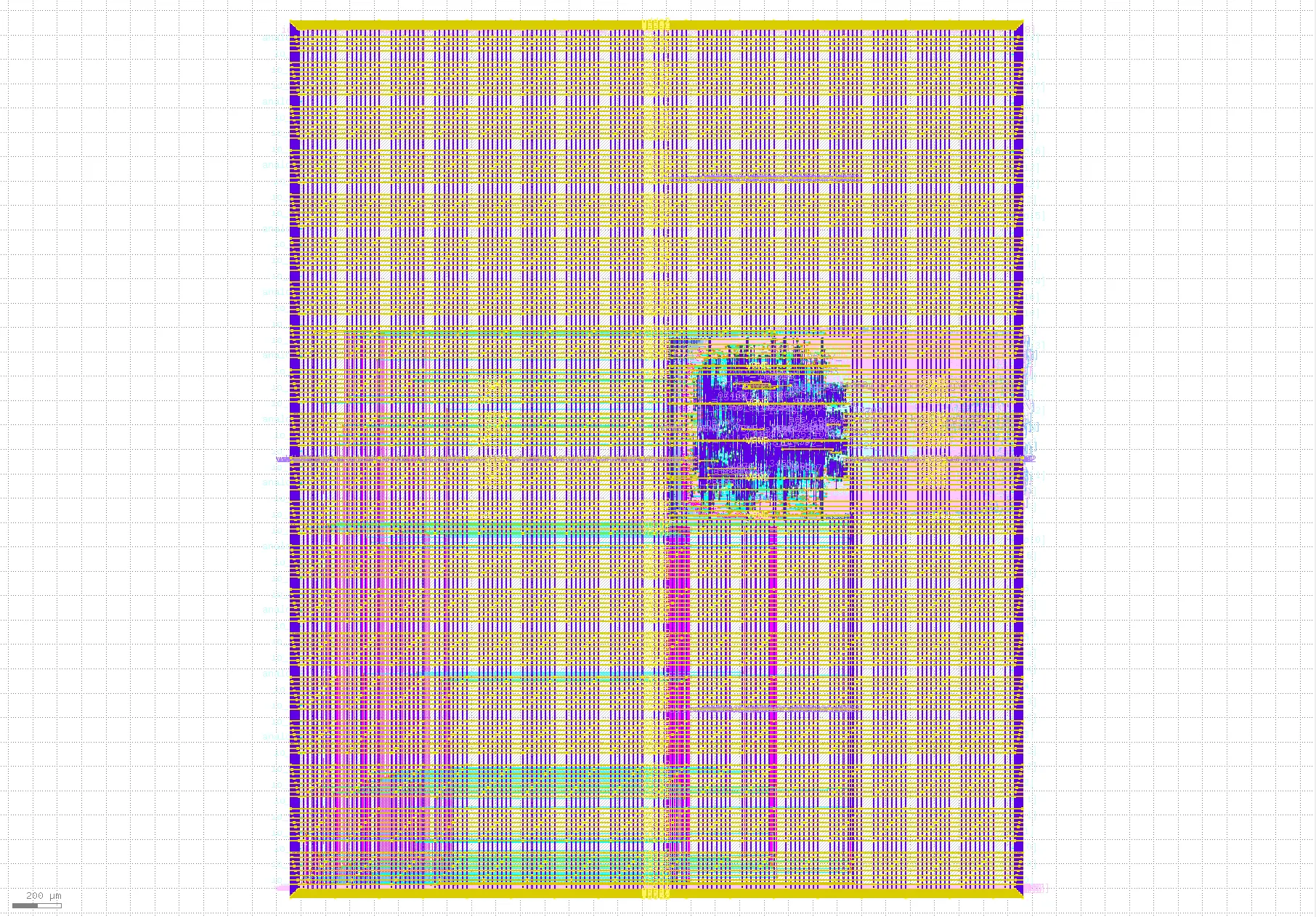
Fig. 26 Final layout of the user_project_wrapper
Tip
You can control the visible layers in KLayout by double-clicking on the
layers you want to hide/unhide. In this figure, the layers areaid.lowTapDensity,
areaid.diode, and areaid.standardc were hidden to view the layout more clearly.
As seen in the layout, we have our aes macro placed around the middle and if we
only show the layers: prBoundary.boundary, met1.drawing, met2.drawing, and
met3.drawing. We will see long and unnecessary routes because of 2 things:
The AES macro is placed very far from its connections. It should be placed at the bottom left corner.
The pins of the AES macro should be on the south only.
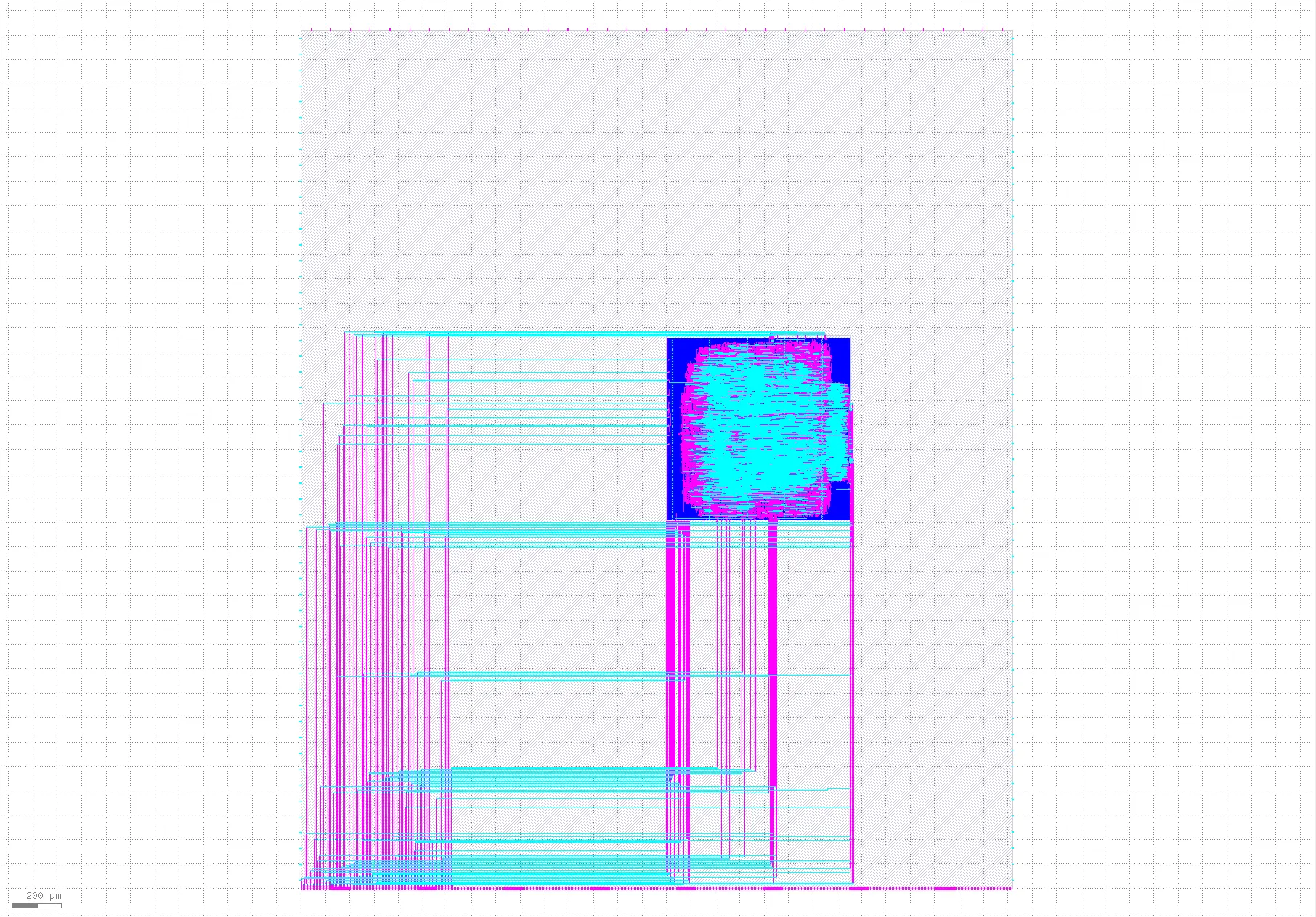
Fig. 27 Long routes in the user_project_wrapper
Checking the reports
OpenROAD.CheckAntennas
There should be no antenna violations.
┏━━━━━━━━━━━━━━━━━━┳━━━━━━━━━━┳━━━━━━━━━┳━━━━━┳━━━━━┳━━━━━━━┓
┃ Partial/Required ┃ Required ┃ Partial ┃ Net ┃ Pin ┃ Layer ┃
┡━━━━━━━━━━━━━━━━━━╇━━━━━━━━━━╇━━━━━━━━━╇━━━━━╇━━━━━╇━━━━━━━┩
└──────────────────┴──────────┴─────────┴─────┴─────┴───────┘
OpenROAD.STAPostPNR
Looking at xx-openroad-stapostpnr/summary.rpt and the Max Slew section in
xx-openroad-stapostpnr/max_ss_100C_1v60/checks.rpt, there are max transition
violations. If we look at the nets with violations, we will find that those are
the long nets we saw in the GDS.
┏━━━━━━━━━━━━━━━━┳━━━━━━━━━━━━━━━━┳━━━━━━━━━━━━━━━━┳━━━━━━━━━━┳━━━━━━━━━━━━━━━━┳━━━━━━━━━━━━━━━━┳━━━━━━━━━━━━━━━━┳━━━━━━━━━━━━━━━━┳━━━━━━━━━━━┳━━━━━━━━━━━━━━━━┳━━━━━━━━━━━━━━━━┳━━━━━━━━━━━━━━━┳━━━━━━━━━━━━━━━━┓
┃                ┃ Hold Worst     ┃ Reg to Reg     ┃          ┃ Hold           ┃ of which Reg   ┃ Setup Worst    ┃ Reg to Reg     ┃           ┃ Setup          ┃ of which Reg   ┃ Max Cap       ┃ Max Slew       ┃
┃ Corner/Group   ┃ Slack          ┃ Paths          ┃ Hold TNS ┃ Violations     ┃ to Reg         ┃ Slack          ┃ Paths          ┃ Setup TNS ┃ Violations     ┃ to Reg         ┃ Violations    ┃ Violations     ┃
┡━━━━━━━━━━━━━━━━╇━━━━━━━━━━━━━━━━╇━━━━━━━━━━━━━━━━╇━━━━━━━━━━╇━━━━━━━━━━━━━━━━╇━━━━━━━━━━━━━━━━╇━━━━━━━━━━━━━━━━╇━━━━━━━━━━━━━━━━╇━━━━━━━━━━━╇━━━━━━━━━━━━━━━━╇━━━━━━━━━━━━━━━━╇━━━━━━━━━━━━━━━╇━━━━━━━━━━━━━━━━┩
│ Overall        │ 0.0108         │ 0.0108         │ 0.0000   │ 0              │ 0              │ 1.6312         │ 7.1309         │ 0.0000    │ 0              │ 0              │ 0             │ 70             │
│ nom_tt_025C_1… │ 0.1371         │ 0.1596         │ 0.0000   │ 0              │ 0              │ 8.2216         │ 16.2820        │ 0.0000    │ 0              │ 0              │ 0             │ 45             │
│ nom_ss_100C_1… │ 0.0830         │ 0.5879         │ 0.0000   │ 0              │ 0              │ 2.2298         │ 7.6748         │ 0.0000    │ 0              │ 0              │ 0             │ 56             │
│ nom_ff_n40C_1… │ 0.0120         │ 0.0120         │ 0.0000   │ 0              │ 0              │ 10.2962        │ 19.5219        │ 0.0000    │ 0              │ 0              │ 0             │ 39             │
│ min_tt_025C_1… │ 0.1579         │ 0.1579         │ 0.0000   │ 0              │ 0              │ 8.8353         │ 16.5546        │ 0.0000    │ 0              │ 0              │ 0             │ 30             │
│ min_ss_100C_1… │ 0.1465         │ 0.5847         │ 0.0000   │ 0              │ 0              │ 2.9034         │ 8.1574         │ 0.0000    │ 0              │ 0              │ 0             │ 38             │
│ min_ff_n40C_1… │ 0.0108         │ 0.0108         │ 0.0000   │ 0              │ 0              │ 10.8591        │ 19.7016        │ 0.0000    │ 0              │ 0              │ 0             │ 28             │
│ max_tt_025C_1… │ 0.1038         │ 0.1618         │ 0.0000   │ 0              │ 0              │ 7.6237         │ 15.9806        │ 0.0000    │ 0              │ 0              │ 0             │ 65             │
│ max_ss_100C_1… │ 0.0268         │ 0.5914         │ 0.0000   │ 0              │ 0              │ 1.6312         │ 7.1309         │ 0.0000    │ 0              │ 0              │ 0             │ 70             │
│ max_ff_n40C_1… │ 0.0135         │ 0.0135         │ 0.0000   │ 0              │ 0              │ 9.7517         │ 19.3107        │ 0.0000    │ 0              │ 0              │ 0             │ 58             │
└────────────────┴────────────────┴────────────────┴──────────┴────────────────┴────────────────┴────────────────┴────────────────┴───────────┴────────────────┴────────────────┴───────────────┴────────────────┘
Max Slew

Pin                                        Limit        Slew       Slack
------------------------------------------------------------------------
wbs_dat_o[2]                            1.500000    5.265976   -3.765976 (VIOLATED)
wbs_dat_o[26]                           1.500000    5.214964   -3.714964 (VIOLATED)
wbs_dat_o[25]                           1.500000    4.767642   -3.267642 (VIOLATED)
wbs_dat_o[8]                            1.500000    4.650988   -3.150988 (VIOLATED)
wbs_dat_o[23]                           1.500000    4.362167   -2.862167 (VIOLATED)
wbs_dat_o[29]                           1.500000    3.906245   -2.406245 (VIOLATED)
wbs_dat_o[28]                           1.500000    3.703813   -2.203813 (VIOLATED)
wbs_dat_o[27]                           1.500000    3.586008   -2.086008 (VIOLATED)
wbs_dat_o[31]                           1.500000    3.301759   -1.801759 (VIOLATED)
wbs_dat_o[17]                           1.500000    2.757454   -1.257454 (VIOLATED)
Magic.DRC
Under the directory xx-magic-drc, you will find a file named reports/drc.rpt
that summarizes the DRC violations reported by magic. The design is DRC clean so
the report will look like this:
aes_wb_wrapper
----------------------------------------
[INFO] COUNT: 0
[INFO] Should be divided by 3 or 4
KLayout.DRC
Under the directory xx-klayout-drc, you will find a file named
violations.json file that summarizes the DRC violations reported by KLayout.
The design is DRC clean so the report will look like this with "total": 0 at
the end:
{
  ⋮
  "total": 0
}
Netgen.LVS
Under the directory xx-netgen-lvs, you will find a file named lvs.rpt that
summarizes the LVS violations reported by netgen. The design is LVS clean so the
last part of the report will look like this:
Cell pin lists are equivalent.
Device classes user_project_wrapper and user_project_wrapper are equivalent.

Final result: Circuits match uniquely.
Re-running the flow with a modified configuration
To fix the long routes issue that causes maximum transition violations, 3 things should be done:
Create the pin order configuration file for
aes_wb_wrapperinlibrelane/aes_wb_wrapper/pin_order.cfg:
pin_order.cfg
#S
wb_.*
wbs_.*
Add the
Odb.CustomIOPlacement::IO_PIN_ORDER_CFGvariable tolibrelane/aes_wb_wrapper/config.json
config.json
{
    "DESIGN_NAME": "aes_wb_wrapper",
    "PDN_MULTILAYER": false,
    "CLOCK_PORT": "wb_clk_i",
    "CLOCK_PERIOD": 25,
    "VERILOG_FILES": [
        "dir::../../../secworks_aes/src/rtl/*.v",
        "dir::../../verilog/rtl/aes_wb_wrapper.v"
    ],
    "FP_CORE_UTIL": 40,
    "RT_MAX_LAYER": "met4",
    "SYNTH_STRATEGY": "DELAY 4",
    "DEFAULT_CORNER": "max_ss_100C_1v60",
    "RUN_POST_GRT_DESIGN_REPAIR": true,
    "PNR_SDC_FILE": "dir::pnr.sdc",
    "SIGNOFF_SDC_FILE": "dir::signoff.sdc",
    "IO_PIN_ORDER_CFG": "dir::pin_order.cfg"
}
Update the location of the macro in the
librelane/user_project_wrapper/config.jsonto[10, 20]
config.json
{
    "//": "Design files",
    "VERILOG_FILES": [
        "dir::../../verilog/rtl/defines.v",
        "dir::../../verilog/rtl/user_project_wrapper.v"
    ],
    "PNR_SDC_FILE": "dir::signoff.sdc",

    "//": "Hardening strategy variables (this is for 1-Macro-First Hardening). Visit https://docs.google.com/document/d/1pf-wbpgjeNEM-1TcvX2OJTkHjqH_C9p-LURCASS0Zo8 for more info",
    "SYNTH_ELABORATE_ONLY": true,
    "RUN_POST_GPL_DESIGN_REPAIR": false,
    "RUN_POST_CTS_RESIZER_TIMING": false,
    "DESIGN_REPAIR_BUFFER_INPUT_PORTS": false,
    "PDN_ENABLE_RAILS": false,
    "RUN_ANTENNA_REPAIR": false,
    "RUN_FILL_INSERTION": false,
    "RUN_TAP_ENDCAP_INSERTION": false,
    "RUN_CTS": false,
    "RUN_IRDROP_REPORT": false,

    "//": "Macros configurations",
    "MACROS": {
        "aes_wb_wrapper": {
            "gds": [
                "dir::../../gds/aes_wb_wrapper.gds"
            ],
            "lef": [
                "dir::../../lef/aes_wb_wrapper.lef"
            ],
            "instances": {
                "mprj": {
                    "location": [10, 20],
                    "orientation": "N"
                }
            },
            "nl": [
                "dir::../../verilog/gl/aes_wb_wrapper.v"
            ],
            "spef": {
                "min_*": [
                    "dir::../../spef/multicorner/aes_wb_wrapper.min.spef"
                ],
                "nom_*": [
                    "dir::../../spef/multicorner/aes_wb_wrapper.nom.spef"
                ],
                "max_*": [
                    "dir::../../spef/multicorner/aes_wb_wrapper.max.spef"
                ]
            },
            "lib": {
                "*": "dir::../../lib/aes_wb_wrapper.lib"
            }
        }
    },
    "PDN_MACRO_CONNECTIONS": ["mprj vccd2 vssd2 VPWR VGND"],

    "//": "PDN configurations",
    "PDN_VOFFSET": 5,
    "PDN_HOFFSET": 5,
    "PDN_VWIDTH": 3.1,
    "PDN_HWIDTH": 3.1,
    "PDN_VSPACING": 15.5,
    "PDN_HSPACING": 15.5,
    "PDN_VPITCH": 180,
    "PDN_HPITCH": 180,
    "QUIT_ON_PDN_VIOLATIONS": false,

    "//": "Magic variables",
    "MAGIC_DRC_USE_GDS": true,

    "MAX_TRANSITION_CONSTRAINT": 1.5,

    "//": "Fixed configurations for Caravel. You should NOT edit this section",
    "DESIGN_NAME": "user_project_wrapper",
    "FP_SIZING": "absolute",
    "DIE_AREA": [0, 0, 2920, 3520],
    "FP_DEF_TEMPLATE": "dir::fixed_dont_change/user_project_wrapper.def",
    "VDD_NETS": [
        "vccd1",
        "vccd2",
        "vdda1",
        "vdda2"
    ],
    "GND_NETS": [
        "vssd1",
        "vssd2",
        "vssa1",
        "vssa2"
    ],
    "PDN_CORE_RING": 1,
    "PDN_CORE_RING_VWIDTH": 3.1,
    "PDN_CORE_RING_HWIDTH": 3.1,
    "PDN_CORE_RING_VOFFSET": 12.45,
    "PDN_CORE_RING_HOFFSET": 12.45,
    "PDN_CORE_RING_VSPACING": 1.7,
    "PDN_CORE_RING_HSPACING": 1.7,
    "CLOCK_PORT": "wb_clk_i",
    "SIGNOFF_SDC_FILE": "dir::signoff.sdc",
    "MAGIC_DEF_LABELS": 0,
    "CLOCK_PERIOD": 25,
    "MAGIC_ZEROIZE_ORIGIN": 0
}
Now let’s re-run the flow for the aes_wb_wrapper:
[nix-shell:~/librelane]$ librelane ~/caravel_aes_accelerator/openlane/aes_wb_wrapper/config.json
Then, after checking the aes_wb_wrapper reports, save the physical views
using:
[nix-shell:~/librelane]$ bash ~/caravel_aes_accelerator/openlane/copy_views.sh ~/caravel_aes_accelerator aes_wb_wrapper RUN_TAG
Then rerun the user_project_wrapper
[nix-shell:~/librelane]$ librelane ~/caravel_aes_accelerator/openlane/user_project_wrapper/config.json
Re-checking the layout
To open the final GDSII layout run this command:
[nix-shell:~/librelane]$ librelane --last-run --flow openinklayout ~/caravel_aes_accelerator/openlane/user_project_wrapper/config.json
Now our macro is placed at the bottom left corner close to the wishbone pins.
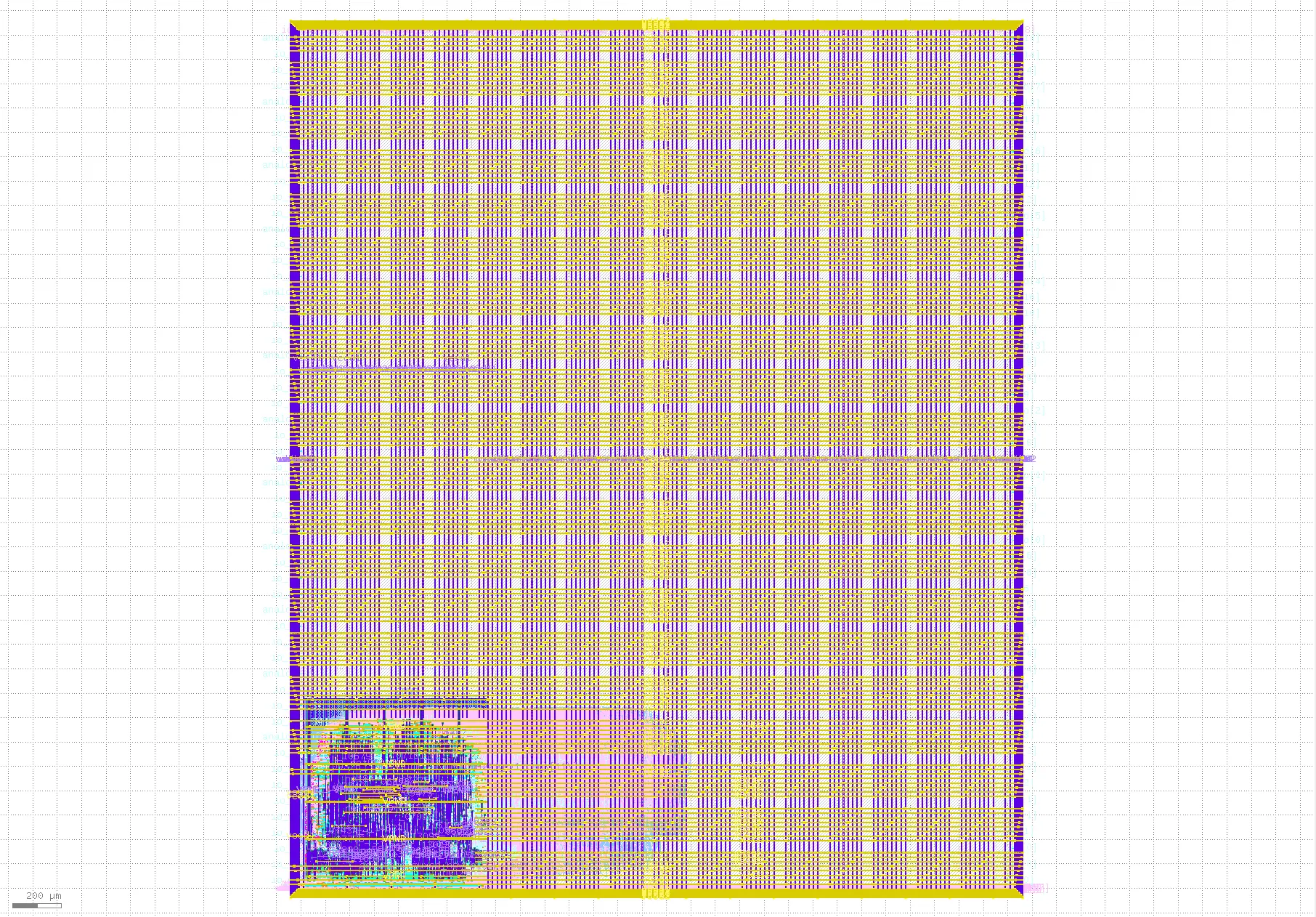
Fig. 28 Final layout of the user_project_wrapper
And if we zoom to the AES macro and view only prBoundary.boundary,
met1.drawing, met2.drawing, and met3.drawing, there are no long routes
anymore.
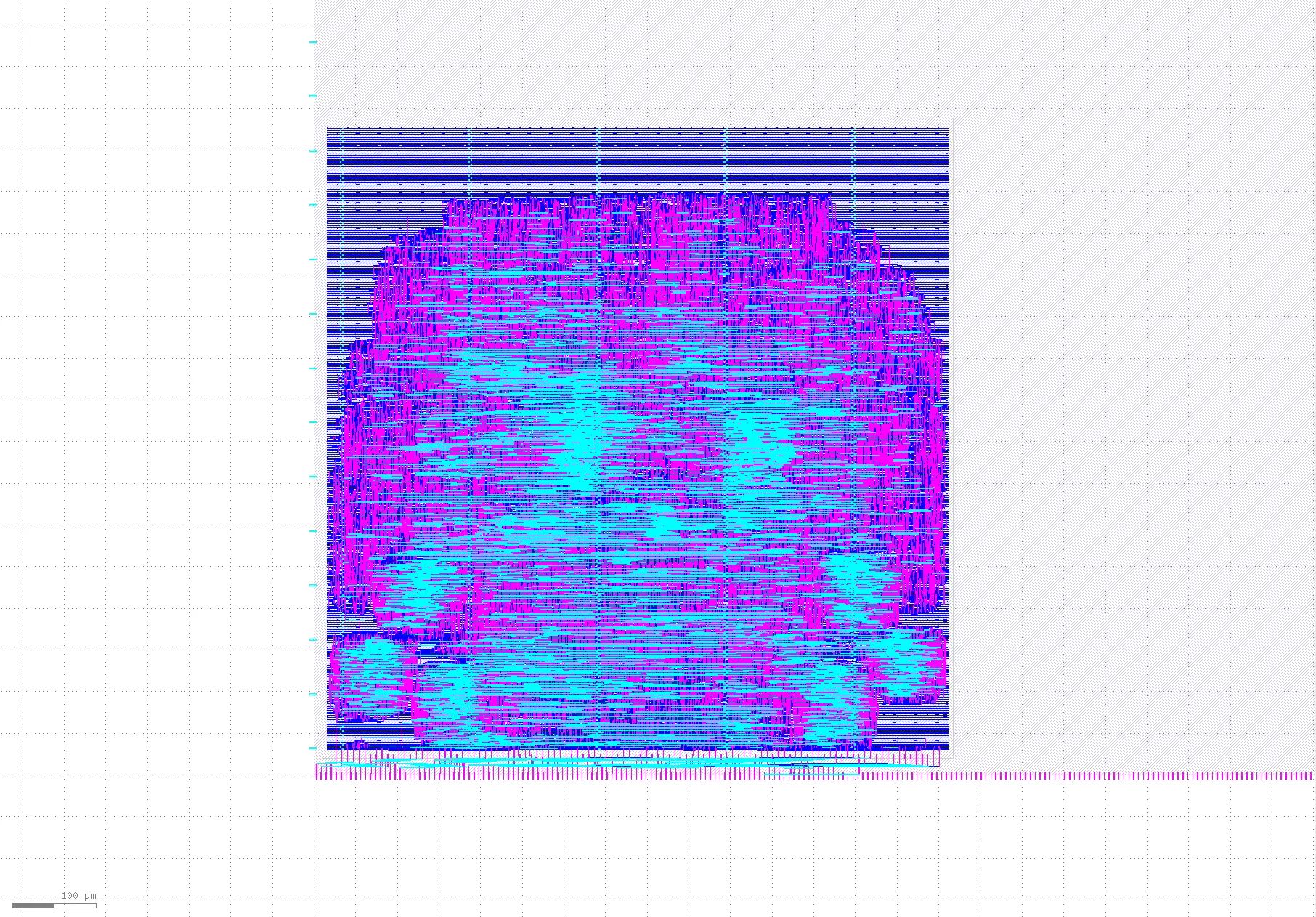
Fig. 29 Shorter routes in the user_project_wrapper
Re-checking the reports
The STA report xx-openroad-stapostpnr/summary.rpt now has no issues:
┏━━━━━━━━━━━━━━━━┳━━━━━━━━━━━━━━━━┳━━━━━━━━━━━━━━━━┳━━━━━━━━━━┳━━━━━━━━━━━━━━━━┳━━━━━━━━━━━━━━━━┳━━━━━━━━━━━━━━━┳━━━━━━━━━━━━━━━━┳━━━━━━━━━━━┳━━━━━━━━━━━━━━━┳━━━━━━━━━━━━━━━━┳━━━━━━━━━━━━━━━┳━━━━━━━━━━━━━━━━┓
┃                ┃ Hold Worst     ┃ Reg to Reg     ┃          ┃ Hold           ┃ of which Reg   ┃ Setup Worst   ┃ Reg to Reg     ┃           ┃ Setup         ┃ of which Reg   ┃ Max Cap       ┃ Max Slew       ┃
┃ Corner/Group   ┃ Slack          ┃ Paths          ┃ Hold TNS ┃ Violations     ┃ to Reg         ┃ Slack         ┃ Paths          ┃ Setup TNS ┃ Violations    ┃ to Reg         ┃ Violations    ┃ Violations     ┃
┡━━━━━━━━━━━━━━━━╇━━━━━━━━━━━━━━━━╇━━━━━━━━━━━━━━━━╇━━━━━━━━━━╇━━━━━━━━━━━━━━━━╇━━━━━━━━━━━━━━━━╇━━━━━━━━━━━━━━━╇━━━━━━━━━━━━━━━━╇━━━━━━━━━━━╇━━━━━━━━━━━━━━━╇━━━━━━━━━━━━━━━━╇━━━━━━━━━━━━━━━╇━━━━━━━━━━━━━━━━┩
│ Overall        │ 0.0502         │ 0.0502         │ 0.0000   │ 0              │ 0              │ 6.0984        │ 6.6834         │ 0.0000    │ 0             │ 0              │ 0             │ 0              │
│ nom_tt_025C_1… │ 0.2279         │ 0.2279         │ 0.0000   │ 0              │ 0              │ 11.0441       │ 16.0780        │ 0.0000    │ 0             │ 0              │ 0             │ 0              │
│ nom_ss_100C_1… │ 0.3832         │ 0.7152         │ 0.0000   │ 0              │ 0              │ 6.2205        │ 7.0983         │ 0.0000    │ 0             │ 0              │ 0             │ 0              │
│ nom_ff_n40C_1… │ 0.0519         │ 0.0519         │ 0.0000   │ 0              │ 0              │ 11.0893       │ 19.4628        │ 0.0000    │ 0             │ 0              │ 0             │ 0              │
│ min_tt_025C_1… │ 0.2256         │ 0.2256         │ 0.0000   │ 0              │ 0              │ 11.0382       │ 16.3619        │ 0.0000    │ 0             │ 0              │ 0             │ 0              │
│ min_ss_100C_1… │ 0.4091         │ 0.7107         │ 0.0000   │ 0              │ 0              │ 6.3816        │ 7.5777         │ 0.0000    │ 0             │ 0              │ 0             │ 0              │
│ min_ff_n40C_1… │ 0.0502         │ 0.0502         │ 0.0000   │ 0              │ 0              │ 11.0806       │ 19.6363        │ 0.0000    │ 0             │ 0              │ 0             │ 0              │
│ max_tt_025C_1… │ 0.2304         │ 0.2304         │ 0.0000   │ 0              │ 0              │ 11.0653       │ 15.8331        │ 0.0000    │ 0             │ 0              │ 0             │ 0              │
│ max_ss_100C_1… │ 0.3418         │ 0.7198         │ 0.0000   │ 0              │ 0              │ 6.0984        │ 6.6834         │ 0.0000    │ 0             │ 0              │ 0             │ 0              │
│ max_ff_n40C_1… │ 0.0537         │ 0.0537         │ 0.0000   │ 0              │ 0              │ 11.1018       │ 19.2829        │ 0.0000    │ 0             │ 0              │ 0             │ 0              │
└────────────────┴────────────────┴────────────────┴──────────┴────────────────┴────────────────┴───────────────┴────────────────┴───────────┴───────────────┴────────────────┴───────────────┴────────────────┘
Saving the views
To save the views, run the following script with the following arguments in order:
The directory of the project
The macro name
The successful run tag
[nix-shell:~/librelane]$ bash ~/caravel_aes_accelerator/openlane/copy_views.sh ~/caravel_aes_accelerator user_project_wrapper RUN_TAG
This will copy the physical views of the macro in the specified run to your project folder.
Congrats! Now you have an AES accelerator as a Caravel user project.